---
title: Help for GrowBig owners and clients | Lpd-Themes
description: "Help for GrowBig owners and my clients: give me access to your HubSpot, find the theme tutorial and licence answers, or ask me directly."
---
[Skip to content](https://www.lpd-themes.com/help#main)
[](https://www.lpd-themes.com/?hsLang=en)
- Services
- [HubSpot website](https://www.lpd-themes.com/hubspot-website)
- [HubSpot integration and CRM](https://www.lpd-themes.com/hubspot-integration)
- [Clients](https://www.lpd-themes.com/case-studies)
- [About](https://www.lpd-themes.com/about)
- [Contact](https://www.lpd-themes.com/contact)
[Start a project](https://www.lpd-themes.com/contact#start)
Menu
Help
# How can I help?
One place for GrowBig owners and clients. Give me access to your HubSpot, find the theme tutorial and answers, or ask me directly.
lpd-themes.com/help
**\>**help --list
- [01 Give me access to your HubSpotFor clients: the user and permissions *→*](https://www.lpd-themes.com/help#access)
- [02 Build with GrowBigTutorial, demo, templates, updates *→*](https://www.lpd-themes.com/help#growbig)
- [03 Licence and payment questionsOne price, invoices, more sites *→*](https://www.lpd-themes.com/help#questions)
- [04 Still stuck? Ask meReply within 24 hours on workdays *→*](https://www.lpd-themes.com/help#ask)
For clients
## Give me access to your HubSpot
I work inside your own HubSpot account, as a user you create. 8 steps, about ten minutes. Pick a step to see where to click.
1. 01Open Users & Teams
2. 02Use the classic wizard
3. 03Add my email
4. 04Give me a Core seat
5. 05Start from scratch
6. 06Marketing permissions
7. 07Account settings
8. 08Create the user and tell me
Step 1 of 8
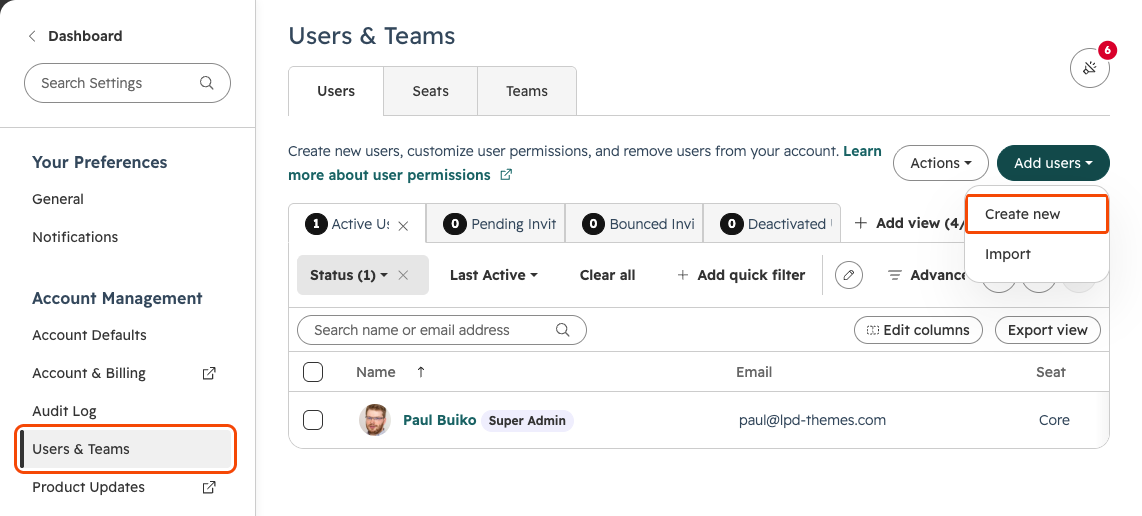
### Open Users & Teams
In HubSpot, click the settings icon, open **Users & Teams**, then click **Add users › Create new**.
app.hubspot.com · your HubSpot
Step 2 of 8
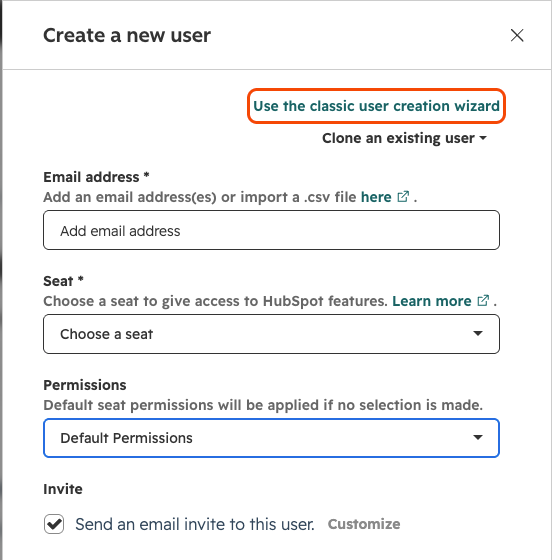
### Use the classic wizard
In the panel that opens, click **Use the classic user creation wizard**. It lets you choose each permission.
app.hubspot.com · your HubSpot
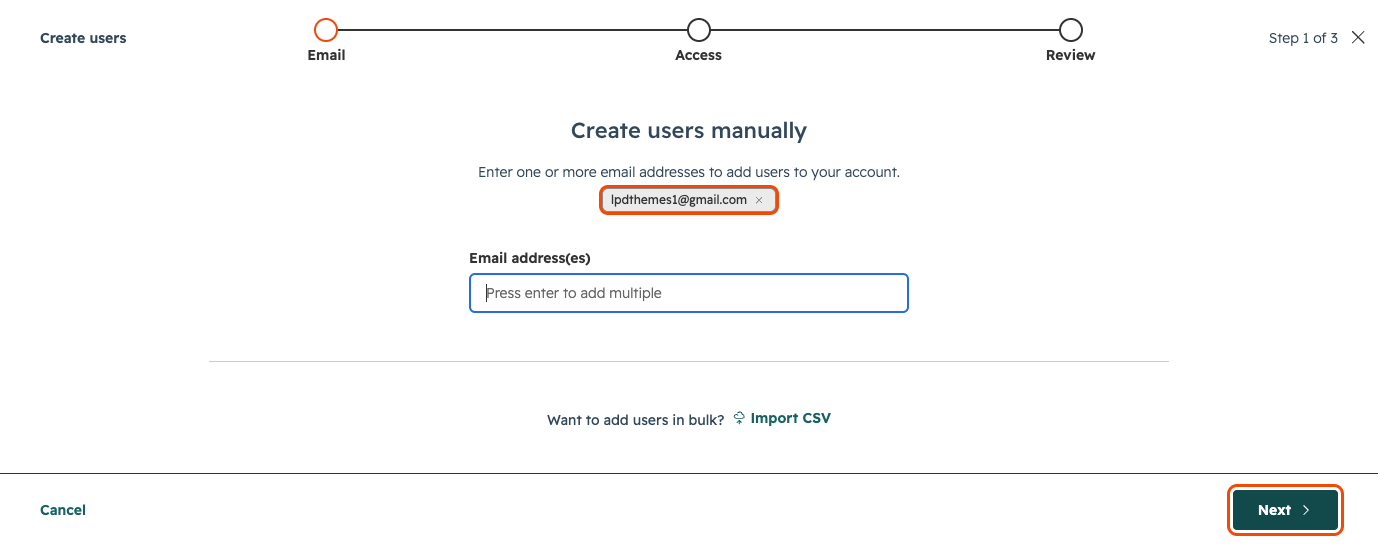
Step 3 of 8
### Add my email
Type lpdthemes1@gmail.com press Enter, then click **Next**.
app.hubspot.com · your HubSpot
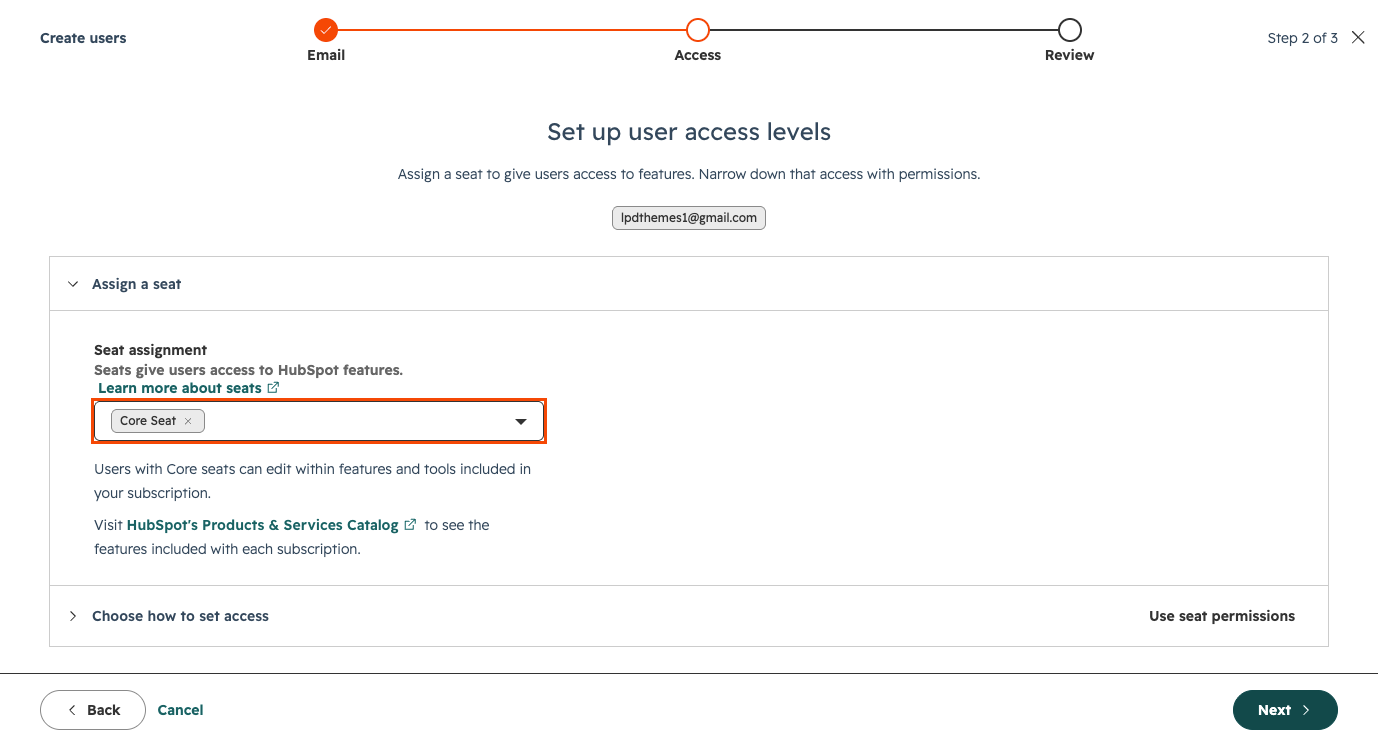
Step 4 of 8
### Give me a Core seat
Under **Assign a seat**, choose **Core Seat**. Users with a Core seat can edit; a View-only seat can’t.
app.hubspot.com · your HubSpot
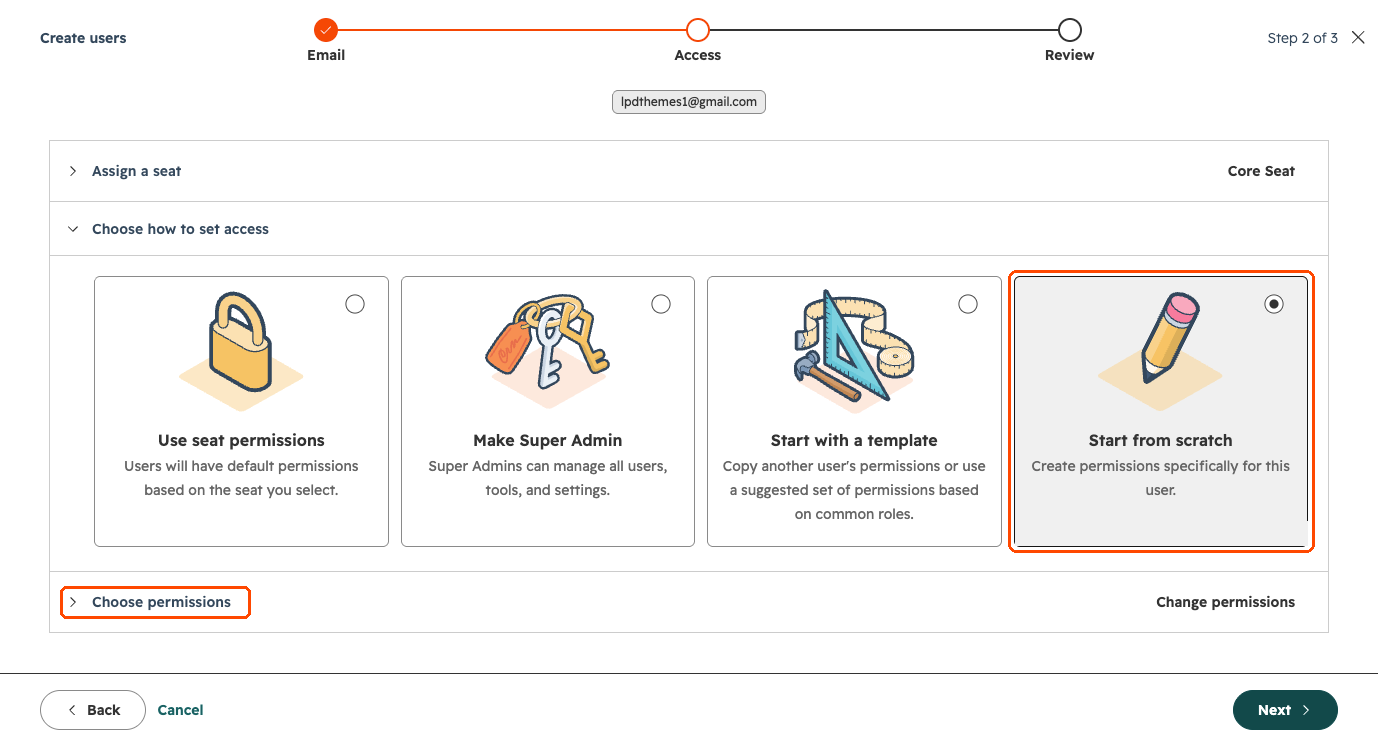
Step 5 of 8
### Start from scratch
Open **Choose how to set access**, pick **Start from scratch**, then open **Choose permissions**.
app.hubspot.com · your HubSpot
Step 6 of 8
### Marketing permissions
Click **Marketing**. Turn on Segments, Forms, Delete form submissions, Files, Marketing Access and CTA, and every website tool: Blog, Landing pages, Website pages, HubDB, URL Redirects, Global content and theme settings, Design tools and Content staging. Open each one and turn on View, Edit and Publish. Leave email, ads, social and the rest off.
app.hubspot.com · your HubSpot
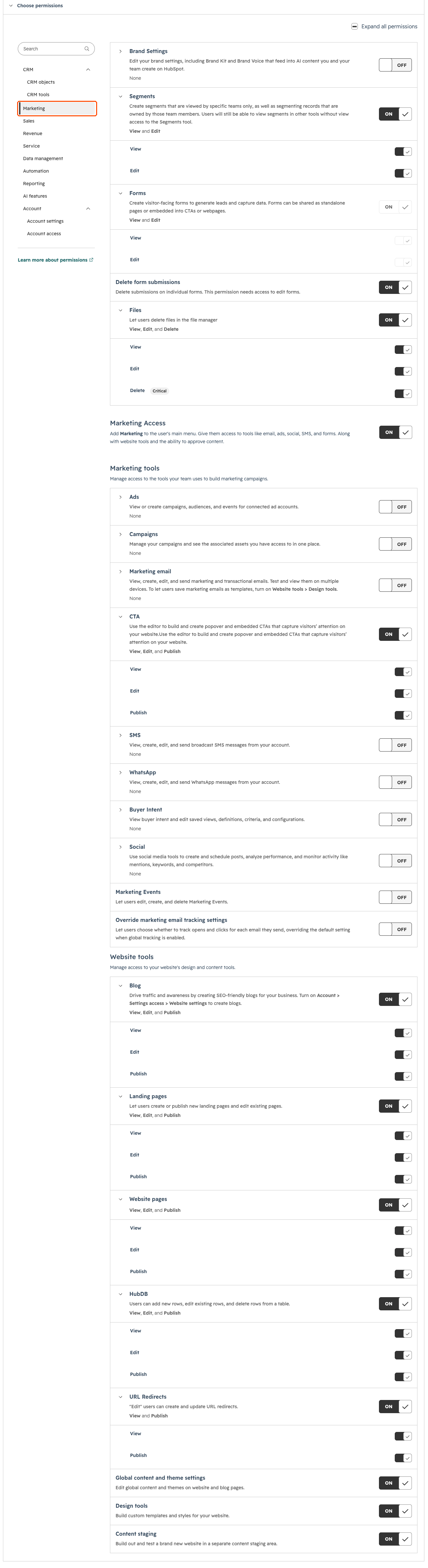
Scroll inside the screenshot to see every permission ↓
Step 7 of 8
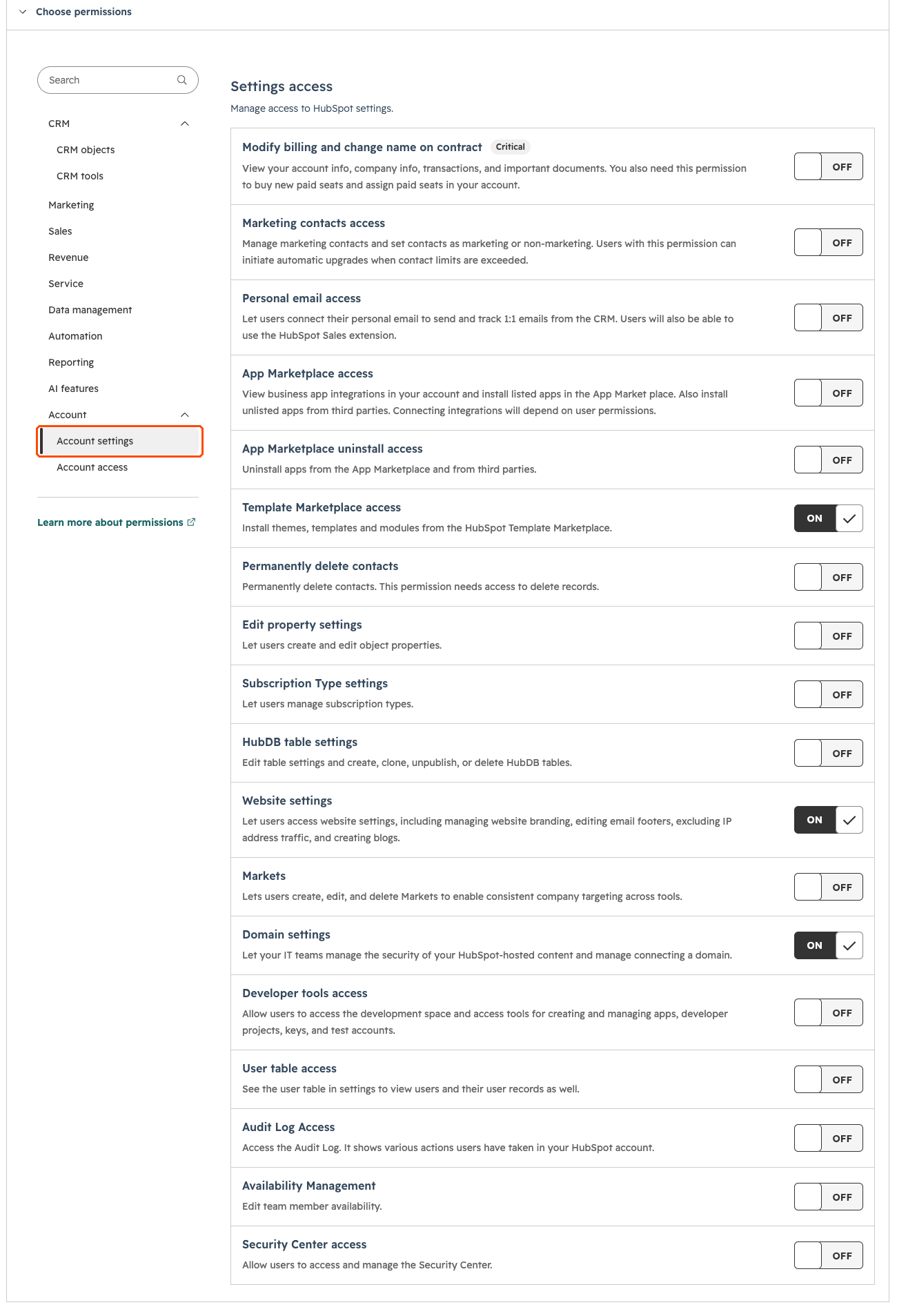
### Account settings
Click **Account settings** and turn on **Template Marketplace access**, **Website settings** and **Domain settings**. Leave billing and the rest off.
app.hubspot.com · your HubSpot
Scroll inside the screenshot to see every permission ↓
Step 8 of 8
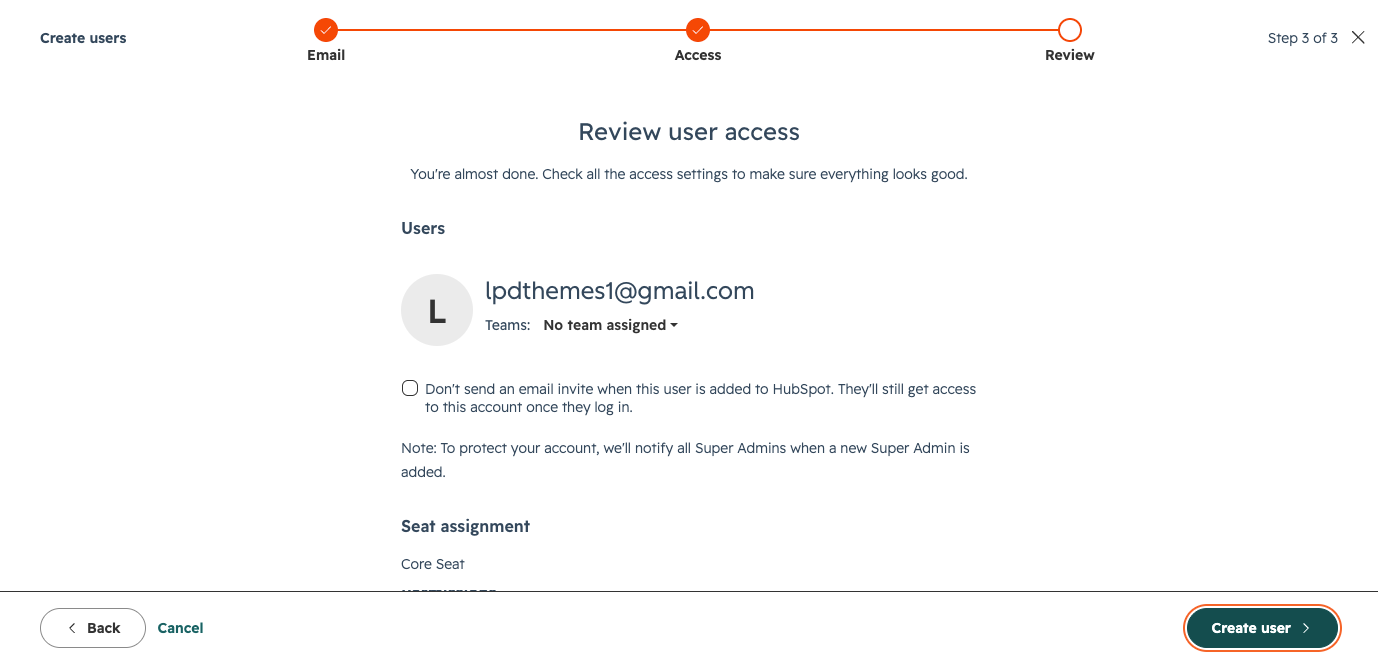
### Create the user and tell me
Click **Next**, check the summary, then **Create user**. Tell me when it’s done and I accept the invite. You can remove my user any time after handover.
app.hubspot.com · your HubSpot
← Back
Step 1 of 8
Next step →
This is the access for website work. For CRM and integration jobs, I send the exact permissions with your price, because they depend on the job. Screenshots from HubSpot, November 2026.
For GrowBig owners
## Build with GrowBig
Everything you need to build and launch the site yourself.
- Tutorial
### HubSpot CMS and GrowBig onboarding
One 70-minute video in 15 chapters, from installing the theme to launch.
[Open the tutorial →](https://www.lpd-themes.com/growbig-onboarding-tutorial?hsLang=en)
- Demo
### GrowBig live demo
See every template before you build.
[Open the demo →](https://demo.lpd-themes.com/growbig/home-1?hsLang=en)
- Figma
### Figma templates
Plan your pages with the same layouts as the theme.
[Get the templates →](https://www.lpd-themes.com/gb-figma-temapltes?hsLang=en)
- Updates
### Theme updates
They come through the HubSpot marketplace. Build on a child theme, and updates never overwrite your work.
[See how in the tutorial →](https://www.lpd-themes.com/growbig-onboarding-tutorial?hsLang=en)
- Free or paid
### GrowBig Free vs paid
What the free version can do, and when you need the paid theme.
[Compare the two →](https://www.lpd-themes.com/growbig-free-vs-paid?hsLang=en)
- Included
### Two consulting sessions
Every GrowBig owner gets two online sessions with me, up to 60 minutes each, to use within 12 months of purchase.
[Book a session →](https://www.lpd-themes.com/help#ask)
Questions
## Licence and payment questions
The ones GrowBig owners send me most.
### Is $997 a one-time price?
Yes. You pay once on the HubSpot marketplace. There’s no yearly fee and no hidden cost, and theme updates are included.
### Can I use it on more than one website?
Yes, on unlimited projects inside the HubSpot account where you bought it. Each other HubSpot account, such as a client’s, needs its own licence.
### Can we pay by invoice?
The marketplace takes card payment and gives you the receipt. If you need an invoice instead, ask me: I can install the theme for you directly, but then it won’t update automatically.
### Can I publish a site on the free version?
No. GrowBig Free is for building and testing: it shows “Build with GrowBig Free” and some features, like links, stop working once published. To launch, you need the paid theme.
### Can I move my Free build to the paid theme?
Yes, if you’re on Content Hub Professional or Enterprise and built on a child theme. Give me access and I can do the switch for you. On Starter it isn’t possible.
### Which HubSpot plan do I need?
Any paid Content Hub plan: Starter, Professional or Enterprise. The theme works the same on all of them.
### Where are the licence terms?
Read the [GrowBig licence](https://www.lpd-themes.com/growbig-hubspot-theme-license-agreement?hsLang=en) or the [GrowBig Free licence](https://www.lpd-themes.com/growbig-free-hubspot-theme-license-agreement?hsLang=en).
Ask me
## Still stuck? Ask me
Tell me what you tried and where it stopped. A screenshot or a link to the page helps.
### What happens next
1. \> 01
**I reply within 24 hours**On workdays, often sooner.
2. \> 02
**Most answers are a short video**Recorded on your own problem, so your team can replay it.
3. \> 03
**Bigger than a question?**You get a fixed price before I do anything.
Faster on LinkedIn? [Message Paul Buiko →](https://www.linkedin.com/in/paulbuiko/)

Built, trained and handed over by Paul Buiko.
- Services
- [HubSpot website](https://www.lpd-themes.com/hubspot-website)
- [HubSpot integration and CRM](https://www.lpd-themes.com/hubspot-integration)
- Products
- [GrowBig theme](https://www.lpd-themes.com/growbig)
- Company
- [Clients](https://www.lpd-themes.com/case-studies)
- [About](https://www.lpd-themes.com/about)
- [Blog](https://www.lpd-themes.com/blog)
- [Help](https://www.lpd-themes.com/help)
- [Contact](https://www.lpd-themes.com/contact)
- Legal
- [Terms](https://www.lpd-themes.com/terms-condition)
- [Privacy](https://www.lpd-themes.com/privacy-policy)
© 2026 South East 1 OÜ (Lpd-Themes) · registry code 12608095 · VAT EE101763466 · Uuepere tn 3, 13522 Tallinn, Estonia ·
Cookie settings
\> hubspot partner --status ⎿ HubSpot Solutions Partner. The program is deprecated. I'm not.
```json
{
"@context" : "https://schema.org",
"@type" : "FAQPage",
"mainEntity" : [ {
"@type" : "Question",
"acceptedAnswer" : {
"@type" : "Answer",
"text" : "Yes. You pay once on the HubSpot marketplace. There’s no yearly fee and no hidden cost, and theme updates are included."
},
"name" : "Is $997 a one-time price?"
}, {
"@type" : "Question",
"acceptedAnswer" : {
"@type" : "Answer",
"text" : "Yes, on unlimited projects inside the HubSpot account where you bought it. Each other HubSpot account, such as a client’s, needs its own licence."
},
"name" : "Can I use it on more than one website?"
}, {
"@type" : "Question",
"acceptedAnswer" : {
"@type" : "Answer",
"text" : "The marketplace takes card payment and gives you the receipt. If you need an invoice instead, ask me: I can install the theme for you directly, but then it won’t update automatically."
},
"name" : "Can we pay by invoice?"
}, {
"@type" : "Question",
"acceptedAnswer" : {
"@type" : "Answer",
"text" : "No. GrowBig Free is for building and testing: it shows “Build with GrowBig Free” and some features, like links, stop working once published. To launch, you need the paid theme."
},
"name" : "Can I publish a site on the free version?"
}, {
"@type" : "Question",
"acceptedAnswer" : {
"@type" : "Answer",
"text" : "Yes, if you’re on Content Hub Professional or Enterprise and built on a child theme. Give me access and I can do the switch for you. On Starter it isn’t possible."
},
"name" : "Can I move my Free build to the paid theme?"
}, {
"@type" : "Question",
"acceptedAnswer" : {
"@type" : "Answer",
"text" : "Any paid Content Hub plan: Starter, Professional or Enterprise. The theme works the same on all of them."
},
"name" : "Which HubSpot plan do I need?"
}, {
"@type" : "Question",
"acceptedAnswer" : {
"@type" : "Answer",
"text" : "Read the GrowBig licence or the GrowBig Free licence."
},
"name" : "Where are the licence terms?"
} ]
}
```